
Repair Workflow Examples
See what a lettings team can have after a 10-working-day Repair Workflow Setup: a live control board, defined ownership and chase rules, an overdue view, tested repair stages, update prompts and a usable handover.
Illustrative examples only. The repairs, properties, people and results shown here are fictional. These are not client case studies, performance claims or screenshots of a software product. They demonstrate the fields, views, checks and working materials that can be configured during a scoped implementation.
Open Repairs Control Board
The daily view is designed to answer nine questions without opening several email threads: which repair, who owns it, what stage is it at, what is it waiting on, what happens next, when is the chase due, have both parties been updated and is anything overdue?
| Open repair | Owner | Status | Waiting on | Next action | Chase date | Tenant updated | Landlord updated | Overdue |
|---|---|---|---|---|---|---|---|---|
| R-1043 · Kitchen leakProperty 014 · Fictional example | Aisha | Awaiting contractor | Attendance ETA | Chase plumber for booking | 14 Jul | Yes · 12 Jul | Yes · 12 Jul | No |
| R-1044 · No hot waterProperty 027 · Fictional example | Daniel | Awaiting approval | Landlord decision | Escalate quote approval | 12 Jul | Yes · 11 Jul | No · due | Yes · 2 days |
| R-1045 · Extractor faultProperty 031 · Fictional example | Maya | Visit booked | Contractor attendance | Confirm tenant access | 15 Jul | Yes · 13 Jul | Yes · 13 Jul | No |
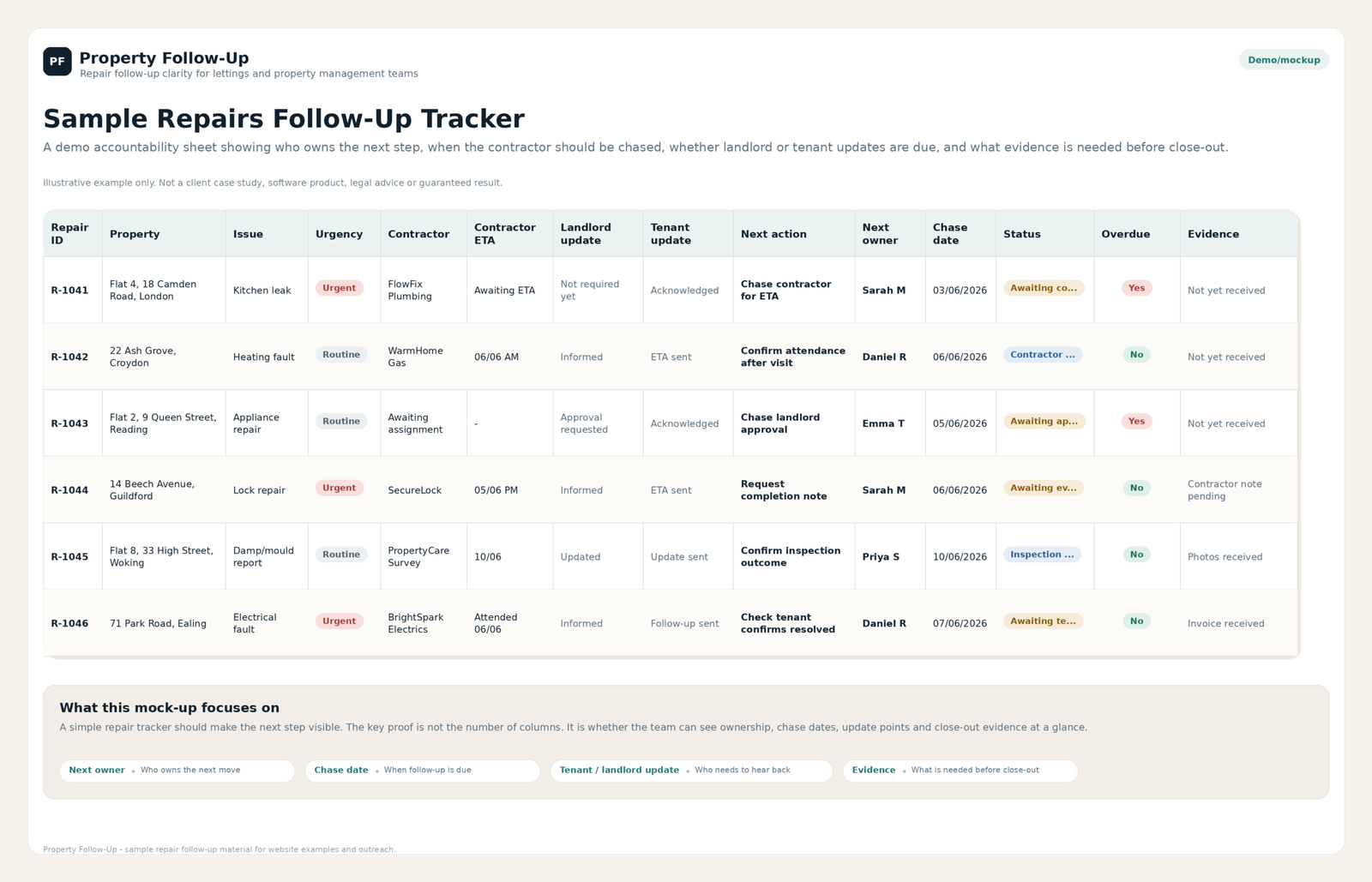
What your team can have after ten working days
The paid outcome is not a folder of generic templates. It is one agreed repair workflow, configured and tested for daily use.
Agreed statuses such as Reported, Awaiting Contractor, Awaiting Approval, Visit Booked, Further Work and Completed.
A daily view showing each open repair’s owner, current position, next action, chase date and update status.
Clear rules for who owns the repair at each stage and when a waiting item must be followed up or escalated.
Defined points for tenant acknowledgements, landlord approvals, delay messages, booking confirmations and close-out updates.
A filtered view showing contractor chases, approvals, access actions and updates that have passed their agreed date.
A demonstration, team training and short operating guide, followed by 14 days of minor in-scope adjustments.
The 10-working-day implementation timeline
The exact dates depend on timely access and client decisions, but the standard setup follows five controlled phases.
Discovery
Review the current repair route, tools, team responsibilities and a small number of anonymised or approved repair examples.
Design approval
Agree the statuses, fields, owners, chase rules, update points and definition of a completed setup.
Implementation
Configure the approved workflow, views, prompts and supporting materials inside the agreed tool.
Testing
Process sample repairs through the workflow, correct in-scope issues and check the agreed acceptance criteria.
Handover
Demonstrate the finished setup, train the team and provide the short operating guide.
Overdue Contractor View
This is not a second system. It is a filtered view of the same repair records, showing only jobs where the contractor action or evidence has passed its chase date.
| Repair | Contractor stage | Owner | Expected by | Days overdue | Required action | Next escalation |
|---|---|---|---|---|---|---|
| R-1037 · Boiler pressure lossFictional example | ETA not confirmed | Daniel | 10 Jul | 4 days | Call contractor and record ETA | Reassign if no reply by 15:00 |
| R-1039 · Window repairFictional example | Quote outstanding | Aisha | 12 Jul | 2 days | Chase written quote | Request alternative contractor tomorrow |
| R-1040 · Bathroom leakFictional example | Completion evidence missing | Maya | 13 Jul | 1 day | Request photos and completion note | Keep repair open until evidence arrives |
One repair tested from report to close-out
The setup is not treated as finished merely because a board exists. A sample repair should move through the agreed stages and leave a clear record at each point.
A sample repair is logged with the required property, issue, owner and acknowledgement status.
The workflow shows what happens next, who owns it and when it must be chased.
The record moves to the correct contractor, landlord or access stage without losing ownership.
Tenant and landlord update fields show whether the relevant communication has been sent.
The repair closes only after completion is confirmed and the agreed evidence or follow-up is recorded.
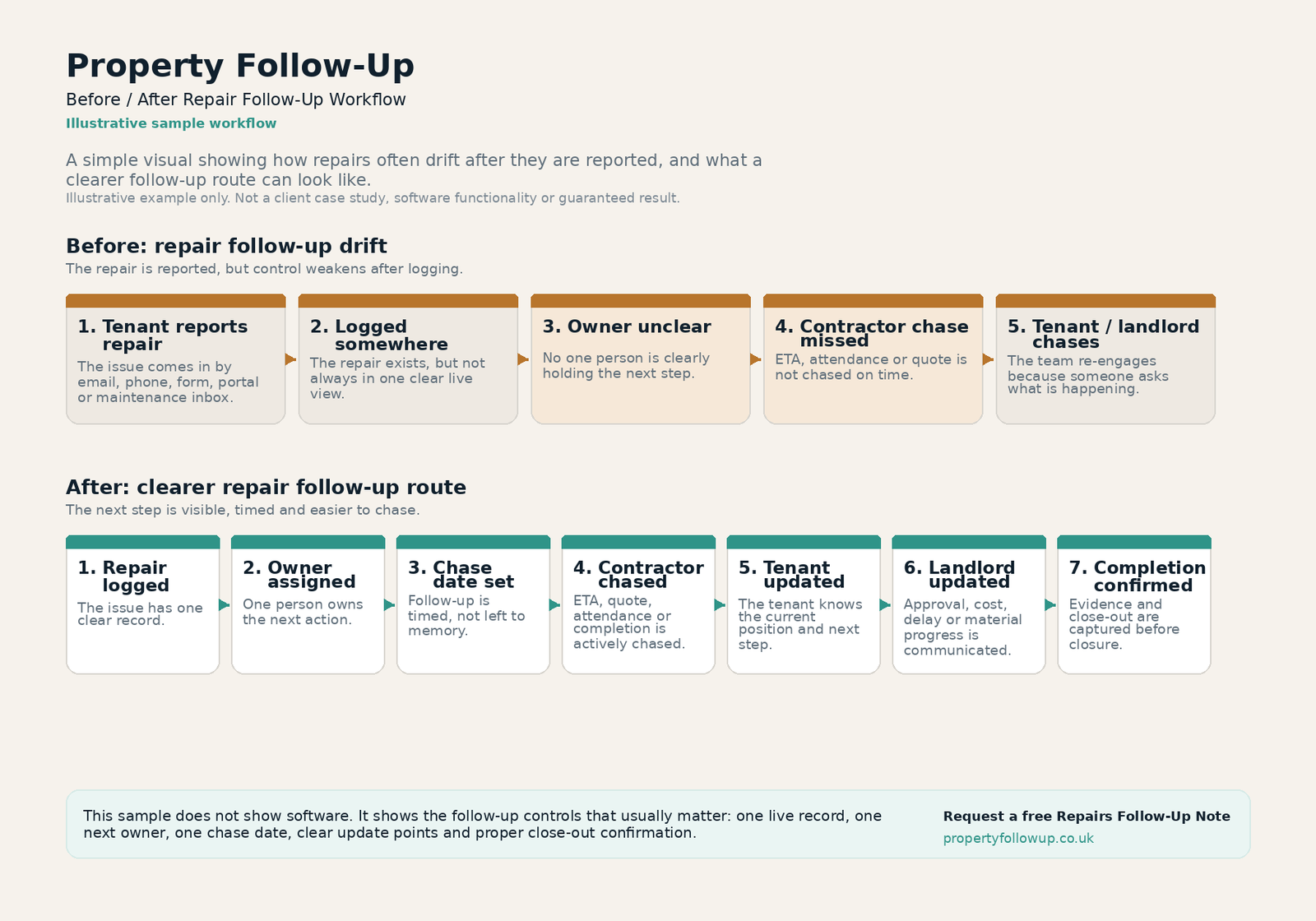
Before / After Repair Follow-Up Workflow
The existing diagram shows the central change: moving from repair drift and memory-based chasing to defined ownership, chase dates, updates and close-out.
- Shows why logging a repair is not enough on its own.
- Connects each waiting stage to an owner and next action.
- Ends with completion confirmation rather than an assumed close.
Short communication prompts tied to repair stages
The implementation can include concise prompts for common decision points. Their value comes from being triggered at the correct stage and recorded against the repair. The value does not come from providing a large generic email library.
Contractor chase
Triggered when the ETA, quote, attendance or completion evidence passes its chase date.
Landlord approval
Triggered when a repair cannot move until the landlord makes a defined decision.
Tenant progress update
Triggered at acknowledgement, booking, delay, further-work and completion-check stages.
Illustrative Repairs Follow-Up Note
This supporting PDF shows the style of concise operational observation used to identify missing ownership and follow-up points. The current Repair Workflow Review develops that thinking into a proposed one-page Setup Plan.
What remains relevant
- Looks for missing ownership after a repair is reported.
- Identifies contractor chasing and update points.
- Keeps observations specific rather than presenting a fake internal audit.
Start with a Repair Workflow Review.
Share how your team currently handles open repairs and, where possible, one or two anonymised examples. The review will show whether a scoped workflow implementation is likely to be useful before paid work begins.